Grow Your Linkedin Profile Faster w/ “Auto Follow” Links
Most people have links to their social media accounts all over the place:
-
Website navbars, footers, blog posts
-
Other social media accounts
-
Linktrees
-
etc.
And if you do, great — but you’re missing out on some easy wins.
Because you’re probably linking like this:
👉 https://www.linkedin.com/in/devinschumacher
Do this instead: 👇
Instead of linking directly to your Linkedin profile URL..
Use a “follow link” so the user gets automatically prompted to follow to you when the page loads!
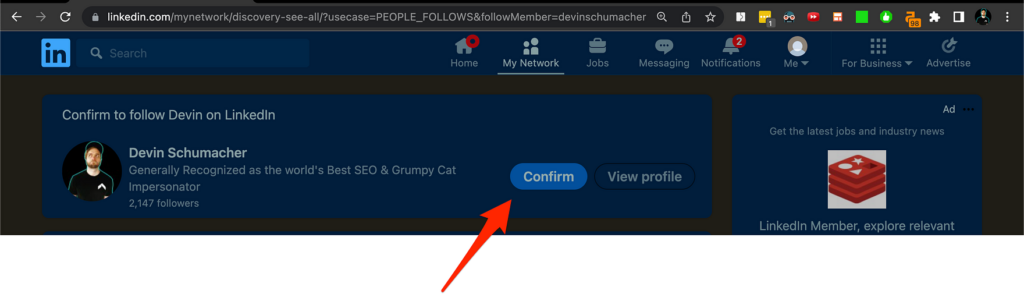
How to make a Linkedin “Follow Link”
There are 2 ways to get this link:
-
You can get it from the Linkedin GUI
-
You can just build the URL
👎 You must have “Creator mode” turned “On” to get link from the GUI
👍 You don't need "Creator mode" turned to "On" to build the URL
First ill show you how to get it from the Linkedin GUI, then I’ll break down how to make the URL (because honestly it’s faster that way).
Method 1: Get it from the Linkedin GUI
https://www.youtube.com/watch?v=vJX1GvAhDio
Method 2: Build the URL path
All you have to do to get this “Confirm to follow YourName on Linkedin” screen is to adjust the URL you link with!
Let’s break it down into 4 parts:
-
The base URL
-
The sub-directory URL path
-
The URL query parameter
-
Your username
Part 1: The base URL
https://www.linkedin.com/
Part 2: The new sub-directory path
mynetwork/discovery-see-all/
Part 3: The query parameter
?usecase=PEOPLE_FOLLOWS&followMember=
Part 4: Your username
devinschumacher
So instead of this: https://www.linkedin.com/in/devinschumacher
You get this:
https://www.linkedin.com/mynetwork/discovery-see-all/?usecase=PEOPLE_FOLLOWS&followMember=devinschumacher
How do you remember all that?
Simple!
Use a link shortener, like serp.ly!
🤔 and if it’s not open for sign-ups yet, you can get updated by subscribing to my email list or joining the SERP discord community!
Cheers & stay funky my friends 🦩